
Web Frontend Development Resources
This page contains a list of resources for front-end web development. It includes links to official documentation, tutorials, and other resources that can help you learn more about HTML, CSS, JavaScript, and other front-end technologies.
Resource note: Review the license or usage terms for images, icons, fonts, APIs, and other third-party resources before using them in a project. Resource links are reviewed periodically; always confirm that the linked content is current and appropriate for your assignment.
Tutorials
These tutorials were selected as supplemental review material for basic concepts.
- Responsive Web Design – freeCodeCamp (HTML, CSS, and accessibility projects)
- JavaScript – freeCodeCamp
🗒️ File Paths and References
A file path is the specific location of a file or folder within a computer's or server's file system. It points to the file's exact directory structure.
Summary
- Starting a path with "/" indicates to go to the root folder and start there.
- Starting a path with "../" indicates to go up one folder and start there.
- Starting a path with "../../" indicates to go two folders back and start there (and so on…).
- Starting a path with "./" indicates to start in the current folder.
- To move forward, start with the first sub-folder and keep moving forward.
- Absolute URL Paths: Absolute URLs give the full address of a resource
and start with a protocol (like
https).<a href="https://www.byui.edu/speeches/devotionals"><img src="https://resource.thesite.com/images/breakfast.svg"> - Server Root – Absolute Path: The root directory of the website/server.
/images/someimage.webpRecommendation: Do not use this root directory type of notation when referencing assets on your pages in WDD courses. It may work locally but not on your GitHub Pages site because you are working in a course repository/sub-directory.
- Relative Path: The path to a file or folder relative to the current page.
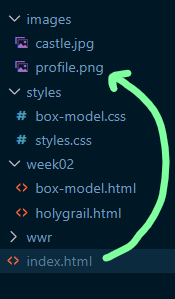 This
example references an image named "profile.png" in a sub-folder named
"images". See the example screenshot to the right.
This example references a file named "aboutus.html" which is located in the same folder as the referencing HTML file that is using an<img src="images/profile.png" alt="Xavier Rodriguez" width="100" height="200">aanchor tag'shrefattribute. The file path is relative to the current file.<a href="aboutus.html">About Us</a> - Parent Directory: To go back to the parent directory from the current directory, use ../ to
reference the parent directory. This example references an image that is located in a folder in the parent directory of
the current page.
../images/someimage.webp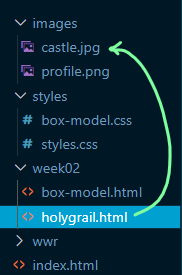 In this
example, the
imgtag withsrcattribute is located in a file named "holygrail.html", which is in a sub-folder named "week02".<img src="../images/castle.jpg" alt="Castle Eltz in Germany" width="200"> - Same Directory: The referenced file exists in the same directory as the current page.
products.htmlAnother way to reference the current directory is to use the
./notation at the beginning of the path. This is typically not necessary because it is implied and can lead to errors especially if you forget the.which then would make the reference a root-relative path/which has different results depending on the server. - Element on the Same Page
An element on the same page can be referenced by using the
#symbol followed by the element's ID.<a href="#section-six">Section Six of the Report</a>
Basic Troubleshooting
- Make sure the file exists where you intended it to reside.
- Check the file path to make sure you are not pointing to the wrong folder or location.
- Check the spelling, including the case if necessary, of the file reference
to make sure it matches the actual file name. Compare the reference to the given source.
Example: Common Error – Letter case does not match
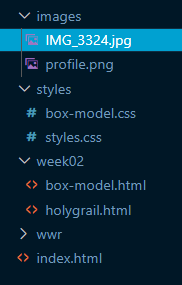
In this example, the reference to the image found in an
imgtag within the index.html file is in error because the case is wrong.<img src="images/img_3324.jpg">In addition, this image file should NOT be left in this naming format. The image file should be given a simple, semantic name like "castle.jpg".
Common Naming Conventions in Programming
- Camel Case
Each word within a compound word name is capitalized except for the first word.julySales, getNewReport() - Pascal Case
Each word within a compound word name is capitalized.JulySales, GetNewReport() - Underscore or Snake Case
Each word within a compound word name is separated by an underscore.july_sales, get_new_report() - Kebab Case
Each word is separated by a hyphen/minus sign.july-sales, get-new-report
"Whenever you develop code in a new language, get comfortable with the variable naming conventions and always check with your team if your organization ever deviates from the standard. It will make your code more readable and help your code blend with all of the code commits, pulls and merges."
– theserverside.com
Optional Resources
- Working with Files – MDN
- Anchors – MDN
HTML: Hypertext Markup Language
HTML is the standard markup language for creating web pages. It describes the structure of web pages using markup.
- Official Documentation: HTML – MDN Web Docs
- Structuring Content with HTML – MDN (includes semantic HTML)
Accessibility (a11y)
Accessibility means building sites that people using assistive technology – screen readers, keyboard-only navigation, voice control – can actually use. It's a core skill, not an optional add-on, and in many contexts it's a legal requirement.
- Accessibility – MDN
- WebAIM – accessibility training and articles
- WCAG 2.2 Quick Reference – W3C
- WAVE – web accessibility evaluation tool
CSS: Cascading Style Sheets
CSS is a stylesheet language that describes the presentation of an HTML document. It is used to style web pages written in HTML and XHTML.
- Official Documentation: CSS – MDN Web Docs
- CSS Flex
- CSS Grid
JavaScript
The JavaScript programming language empowers developers to create dynamic content, handle user input, manipulate the DOM (Document Object Model), build engaging user interfaces, and more.
- MDN Web Docs: Dynamic Scripting with JavaScript | JavaScript Documentation
- JavaScript Tutorials: JavaScript.info
- Modern JavaScript
- JavaScript Modules – MDN
- Using the Fetch API – MDN
- Promises & Async/Await – MDN
Browser DevTools
Browser developer tools let you inspect, debug, and test your HTML, CSS, and JavaScript directly in the browser as your page runs – essential for troubleshooting layout issues and script errors.
- Chrome DevTools – official documentation
- Lighthouse – automated performance, accessibility, and SEO audits
Images and Graphics
Images and graphics can make or break a web design. They can help make your website more visually appealing, informative, and engaging.
- Free Images/Photos: Unsplash
- Fonts and icons: Google Fonts | Google Material Symbols
- Placeholders: placehold.co
- Resizing and optimization: Squoosh
Git and GitHub
Git is a distributed version control system that allows you to track changes in your code and collaborate with other developers. GitHub is a web-based platform that provides hosting for Git repositories and tools for collaboration.
- Git – official documentation
- Get Started with GitHub – official documentation
- The Git Workflow
- Working in GitHub – Video Demonstrations
Wireframing
Wireframing is an essential part of the web planning and design process. It allows you to create a visual representation of your website's layout and structure before you start building it.
Visual Studio Code (VS Code)
Visual Studio Code is a lightweight but powerful source code editor that runs on your desktop and is available for Windows, macOS, and Linux. It comes with built-in support for JavaScript, TypeScript, and Node.js and has a rich ecosystem of extensions for other languages (such as C++, C#, Python, PHP) and runtimes.
APIs
APIs (Application Programming Interfaces) are a set of rules and protocols that allow different software applications to communicate with each other. They enable developers to access data and services from other applications and use them in their own applications.
- Public APIs – community-maintained list
Additional Front-End Topics
These topics support building responsive, accessible, and maintainable web applications.
- Responsive design – MDN
- Web performance – MDN
- Web forms – MDN
- HTTP – MDN
Artificial Intelligence (AI)
Use artificial intelligence responsibly and follow the course or institution's AI policies. AI tools can support learning, but students remain responsible for understanding, verifying, and appropriately citing their work.
Official Standards Organizations
These organizations are responsible for developing and maintaining the standards that govern the web.
- WHATWG
- W3C – The World Wide Web Consortium – HTML, CSS, and accessibility
- Ecma International – JavaScript (ECMAScript)