Product Objective
For this lab we'll build and integrate an API to handle data securely for the technicians. We'll also increase security for the service requests by only sending data required for the display.
Login
Before you begin, make sure that you can login to the web app. Open up your Quick Oil Change app and click on "Login".
You can use the credentials you created earlier for janedoe
- Username: janedoe
- Password: Ilove2SeeTheTemple!!
If that password doesn't work, try ILove2SeeTheTemple!
Previous Labs
If you are unable to login, please go back and complete Lab 3. This lab requires you to be able to login to the app.
Create lambda
Create a new lambda function:
- Name: adminGetServiceRequest
- Runtime: Node.js 20.x (or the latest version)
- Use exisiting role
- Existing Role: LabRole
Create a file named adminDynamoService.mjs
import { DynamoDBClient } from "@aws-sdk/client-dynamodb";
import {
  DynamoDBDocumentClient,
  ScanCommand,
  PutCommand,
  GetCommand,
  DeleteCommand,
  UpdateCommand,
} from "@aws-sdk/lib-dynamodb";

const client = new DynamoDBClient({});

const mydynamodb = DynamoDBDocumentClient.from(client);

const tableName = "VehicleServices";

export const getDynamoServiceRequests = async () => {
    const statusToExclude = "Completed";
    const statusToExcludeRejected = "Service Rejected";

    try {
        const params = {
            TableName: tableName,
            FilterExpression: "attribute_not_exists(service_status) OR (#service_status <> :status AND #service_status <> :statusRejected)",
            ExpressionAttributeNames: {
                "#service_status": "service_status"
            },
            ExpressionAttributeValues: {
                ":status": statusToExclude,
                ":statusRejected":statusToExcludeRejected
            }
        };
        const body = await mydynamodb.send(new ScanCommand(params));
        return body.Items; // Return JSON string of items
    } catch (error) {
        console.error("Error fetching DynamoDB service requests:", error);
        throw error; // Re-throw the error to handle it further up the call stack
    }
}

export const addDynamoServiceRequest = async (requestBody) => {
  try {
    const serviceId = generateServiceId(); // Generate unique service_id based on current date and time
    const params = {
      TableName: tableName,
      Item: {
        service_id: serviceId, // Assuming service_id is provided in requestBody
        service_status: "New Request",
        service_description: requestBody.service_description,
        phone_number: requestBody.phone_number,
        license_plate: requestBody.license_plate ?? "Unknown", // Use requestBody.license_number or default to "Unknown"
      },
    };

    await mydynamodb.send(new PutCommand(params));

    return `Successfully added new service request`;
  } catch (error) {
    console.error("Error adding DynamoDB service request:", error);
    throw error; // Re-throw the error to handle it further up the call stack
  }
};

export const updateDynamoServiceRequest = async (requestBody, serviceId) => {
  try {

    const licensePlate = requestBody.license_plate ?? "Unknown";

    // Check if the item exists
    const getParams = {
      TableName: tableName,
      Key: {
        service_id: serviceId,
        license_plate: licensePlate,
      },
    };

    const { Item } = await mydynamodb.send(new GetCommand(getParams));

    if (!Item) {
      throw new Error("No record found");
    }

    // Initialize the UpdateExpression components
    let updateExpression = "set";
    const expressionAttributeNames = {};
    const expressionAttributeValues = {};

    // Dynamically build the UpdateExpression, ExpressionAttributeNames, and ExpressionAttributeValues
    if (requestBody.service_description) {
      updateExpression += " #sd = :sd,";
      expressionAttributeNames["#sd"] = "service_description";
      expressionAttributeValues[":sd"] = requestBody.service_description;
    }
    if (requestBody.phone_number) {
      updateExpression += " #pn = :pn,";
      expressionAttributeNames["#pn"] = "phone_number";
      expressionAttributeValues[":pn"] = requestBody.phone_number;
    }
    if (requestBody.service_status) {
      updateExpression += " #ss = :ss,";
      expressionAttributeNames["#ss"] = "service_status";
      expressionAttributeValues[":ss"] = requestBody.service_status;
    }

    // Remove any trailing comma from the update expression
    updateExpression = updateExpression.replace(/,$/, "");

    const params = {
      TableName: tableName,
      Key: {
        service_id: serviceId,
        license_plate: requestBody.license_plate ?? "Unknown", // Assuming license_plate is part of the key
      },
      UpdateExpression: updateExpression,
      ExpressionAttributeNames: expressionAttributeNames,
      ExpressionAttributeValues: expressionAttributeValues,
    };

    await mydynamodb.send(new UpdateCommand(params));

    return `Successfully updated service request`;
  } catch (error) {
    if (error.message === "No record found") {
      return error.message;
    } else {
      console.error("Error updating DynamoDB service request:", error);
      throw error; // Re-throw the error to handle it further up the call stack
    }
  }
};


// Helper function to generate a unique service_id based on current date and time
const generateServiceId = () => {
  const now = new Date();
  const formattedDate = now.toISOString().replace(/[-T:.Z]/g, ""); // Format date string
  const milliseconds = now.getMilliseconds().toString().padStart(3, "0"); // Get milliseconds and pad with leading zeros if necessary
  return `${formattedDate}${milliseconds}`; // Concatenate date and milliseconds
};
Update the index.mjs with the following code:
import { getDynamoServiceRequests, addDynamoServiceRequest, updateDynamoServiceRequest } from './adminDynamoService.mjs';

const commonHeaders = {
  'Content-Type': 'application/json',
  'Access-Control-Allow-Headers': 'Content-Type',
  'Access-Control-Allow-Origin': '*',
  'Access-Control-Allow-Methods': 'OPTIONS,POST,GET,PUT'
};

export const handler = async (event) => {
  try {

    const httpMethod = event.httpMethod;
    const path = event.path;
    const resource = event.resource;
    const pathParameters = event.pathParameters;
    const queryParameters = event.queryStringParameters;
    const requestBody = event.body ? JSON.parse(event.body) : null;
    let jsonArray = [];

    switch (httpMethod) {
      case "GET":
        jsonArray = await getDynamoServiceRequests();
        break;
      case "PUT":
        console.log("puting");
        if (pathParameters && pathParameters.id) {
          jsonArray = await updateDynamoServiceRequest(requestBody,pathParameters.id);
          // jsonArray = `${pathParameters.id} ${requestBody}`;
        }
        else {
          jsonArray = "Missing ID"
        }
        // jsonArray = "Posted";
        break;

    }

    const response = {
      statusCode: 200,
      body: JSON.stringify(jsonArray),
      headers: commonHeaders
    };
    return response;
  } catch (error) {
    console.error('Error:', error);
    const response = {
      statusCode: 500,
      body: JSON.stringify({ message: 'Internal Server Error' }),
      headers: commonHeaders
    };
    return response;
  }
};
Update getServiceRequest (NOT adminGetServiceRequest)
We are going to update the original getServiceRequest to only send information that is needed for the regular users. Go to the lambda function you have created and click on getServiceRequest
Update dynamoService.mjs (Make sure you are NOT updating adminDynamoService)
import { DynamoDBClient } from "@aws-sdk/client-dynamodb";
import {
  DynamoDBDocumentClient,
  ScanCommand,
  PutCommand,
  GetCommand,
  DeleteCommand,
} from "@aws-sdk/lib-dynamodb";

const client = new DynamoDBClient({});

const mydynamodb = DynamoDBDocumentClient.from(client);

const tableName = "VehicleServices";

export const getDynamoServiceRequests = async () => {
    const statusToExclude = "Completed";
    const statusToExcludeNew = "New Request";
    const statusToExcludeRejected = "Service Rejected";
    try {
        const params = {
            TableName: tableName,
            FilterExpression: "attribute_not_exists(service_status) OR (#service_status <> :status AND #service_status <> :statusNew AND #service_status <> :statusRejected)",
            ExpressionAttributeNames: {
                "#service_status": "service_status",
                "#service_id":"service_id",
                "#phone_number": "phone_number" // Add license_plate to ExpressionAttributeNames0
            },
            ExpressionAttributeValues: {
                ":status": statusToExclude,
                ":statusNew": statusToExcludeNew,
                ":statusRejected": statusToExcludeRejected
            },
            ProjectionExpression: "#service_status, #service_id, #phone_number" // Specify the attributes to retrieve
        };
        const body = await mydynamodb.send(new ScanCommand(params));
        // Process the items to include only the last four digits of the phone number
        const processedItems = body.Items.map(item => {
            const processedItem = {
                service_status: item.service_status,
                service_id: item.service_id,
                phone_number: item.phone_number ? item.phone_number.slice(-4) : null // Extract the last four digits
            };
            return processedItem;
        });

        return processedItems;
        // return body.Items; // Return JSON string of items
    } catch (error) {
        console.error("Error fetching DynamoDB service requests:", error);
        throw error; // Re-throw the error to handle it further up the call stack
    }
}

export const addDynamoServiceRequest = async (requestBody) => {
  try {
    const serviceId = generateServiceId(); // Generate unique service_id based on current date and time
    const params = {
      TableName: tableName,
      Item: {
        service_id: serviceId, // Assuming service_id is provided in requestBody
        service_status: "New Request",
        service_description: requestBody.service_description,
        phone_number: requestBody.phone_number,
        license_plate: requestBody.license_plate ?? "Unknown", // Use requestBody.license_number or default to "Unknown"
      },
    };

    await mydynamodb.send(new PutCommand(params));

    return `Successfully added new service request`;
  } catch (error) {
    console.error("Error adding DynamoDB service request:", error);
    throw error; // Re-throw the error to handle it further up the call stack
  }
};


// Helper function to generate a unique service_id based on current date and time
const generateServiceId = () => {
  const now = new Date();
  const formattedDate = now.toISOString().replace(/[-T:.Z]/g, ""); // Format date string
  const milliseconds = now.getMilliseconds().toString().padStart(3, "0"); // Get milliseconds and pad with leading zeros if necessary
  return `${formattedDate}${milliseconds}`; // Concatenate date and milliseconds
};
Create a new API Gateway resource
We'll add a new endpoint which will provide a secure location for our logged in users to pull information.
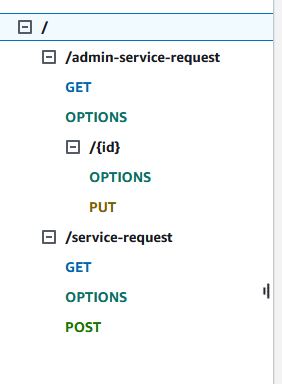
Go to our vehicleapp API Gateway. Click on the /.
- Click
- Resource Name: admin-service-request
- Check CORS
Create an Authorizer
We can enhance our API Gateway endpoint by integrating an authorizer. By linking our Cognito service to the endpoint, we can verify that each request includes a valid token. The gateway will verify this token before executing the code, providing an added layer of security.
- On the left hand side of the API Gateway choose Authorizers
- Authorizer Name: AdminServiceRequestAuthorizer
- Authorizer Type: Cognito
- Cognito User Pool: Pick the pool from the dropdown
- Token Source: Authorization
Create a Get Method in the API Gateway
- Create a Get Method under admin-service-requests
- Get
- Lambda Proxy: turn on
- lambda: adminGetServiceRequest
- Method request settings -> Authorization: AdminServiceRequestAuthorizer
Create a new resource under /admin-service-requests
- Click on
- Click
- Don't turn on Proxy
- Resource Path: /admin-service-request/
- Resource Name: {id}
- check CORS
We will create a PUT method for the new resource /admin-service-requests/{id} that we just created.
- Create Method: PUT
- Lambda
- Lambda Proxy Integration
- adminGetServiceRequest
- Method request Settings -> Authorization: AdminServiceRequestAuthorizer
Update code
to your Vehicle App EC2 Instance
Download the newest website app:
wget https://github.com/byui-cse/itm300-course/raw/main/source/module-07/rebuildapp.sh
chmod +x ./rebuildapp.sh
Next run the script which will download the newest files.
sudo bash ./rebuildapp.sh
You'll be prompted to enter multiple settings.
Caching
The code that you have updated may not show up because it is cached in the browser. Forcing the browser to refresh the cache will allow the new code to show up.
When you go to the "Request Service" page and when you go to the "Admin" page, you'll need to refresh the cache.
Holding Ctrl and pressing the button on your browser will normally force a cache refresh.
You can also try Ctrl-Shift-R or CMD-Shift-R or Ctrl-F5
Once you've completed, check the following:
- Can you submit a Service Request from the Request Page?
- Can you log in to the Admin area?
- Can you update a status from the Admin Area?
- Do Completed items disappear from the Service Request page?
- Verify that items with a status of "Completed", "New Request", or "Service Rejected" do not show up on the Service Request page that the public can see.
Lab Summary:
In this lab, you extended your vehicle service application by building and integrating an API to handle data securely for technicians. The key tasks included creating a new API Gateway resource, adding a PUT method for updating service requests, implementing an authorizer for security, and updating the Lambda function to interact with DynamoDB. You also updated the web application enabling administrators to manage these requests securely.
Key Concepts Explained:
- API Gateway and Lambda Integration: API Gateway acts as a front door for applications to access data, business logic, or functionality from your backend services. In this lab, you created new endpoints in API Gateway that integrate with AWS Lambda functions. This setup allows your application to handle HTTP requests and execute backend logic without managing any servers.
- Cognito Authorizer: By using Amazon Cognito as an authorizer, you ensured that only authenticated users can access certain API endpoints. This enhances security by validating tokens included in requests, thereby controlling access based on user authentication status.
- DynamoDB Operations: You updated your Lambda functions to perform CRUD (Create, Read, Update, Delete) operations on the DynamoDB table. DynamoDB is a managed NoSQL database service that provides fast and predictable performance with seamless scalability. By leveraging DynamoDB, your application can efficiently handle and store service request data.
Reflective Questions:
- How does using an authorizer with API Gateway improve the security of your application?
- What are the benefits of using a serverless architecture with AWS Lambda and DynamoDB for managing backend operations?
- How do API Gateway, Lambda, and DynamoDB work together to create a scalable and secure backend for your application?
- What considerations should you take into account when designing an API to handle sensitive data, such as service requests?
Troubleshooting
If the app isn't working try the following:
- Use the JavaScript Error Console to see what errors you may be receiving
- Look at CloudWatch to see what errors are happening with the lambda
- Test your api to see if it gives you correct information back
- You may need to update your settings.js file in the /var/www/html/scripts/
You can use the following to update your settings file:
Update settings code
to your Vehicle App EC2 Instance
Download the newest website app:
wget https://github.com/byui-cse/itm300-course/raw/main/source/module-10/rebuildsettings.sh
chmod +x ./rebuildsettings.sh
Next run the script which will download the newest files.
sudo bash ./rebuildsettings.sh