
W02 Activity (1 of 3): ERD and Datatypes
For this class you were asked to gather data about images, other classes were asked to gather data about what distracts them and what worries them. Here is one way the data we gathered might be represented in an Entity Relationship Diagram or ERD. This is a visual representation of each entity in our database and how they are related. We will learn all about the relationships between entities (later this week) which is represented by the lines connecting the tables.
                              ┌───────────────────────┐
                              │ worry                 │
                              ├───────────────────────┤
                              │ worry_id INT          │
                          ┌──<│ worry_type ENUM(...)  │
                          │   │ ctrl_pattern ENUM(...)│
                          │   │ student_id INT        │
┌─────────────────────┐   │   └───────────────────────┘
│ student             │   │   ┌───────────────────┐
├─────────────────────┤   │   │ image             │
│ student_id INT      │1──┘   ├───────────────────┤
│ lname VARCHAR(35)   │       │ image_id INT      │
│ fname VARCHAR(25)   │1─────<│ location ENUM(...)│
│ gender ENUM('M','F')│       │ type ENUM(...)    │
│ major VARCHAR(25)   │1──┐   │ student_id INT    │
└─────────────────────┘   │   └───────────────────┘
                          │   ┌──────────────────────┐
                          │   │ distraction          │
                          │   ├──────────────────────┤
                          └──<│ distraction_id INT   │
                              │ distraction ENUM(...)│
                              │ student_id INT       │
                              └──────────────────────┘
Here we have included an entity representing each student that gathered the data. This would represent data gathered by many different students. The entities distraction, worry, and image would hold the data that comes from the data gathered from, images, worries and distractions.
Here's another example of how an ERD might have been designed.
                               ┌───────────────────────────┐
                               │ student                   │
┌───────────────────────┐      ├───────────────────────────┤      ┌─────────────────────┐
│ student_group         │      │ student_id INT            │      │      image          │
├───────────────────────┤      │ lname VARCHAR(35)         │      ├─────────────────────┤
│ group_id INT          │1────<│ fname VARCHAR(25)         │1────<│ image_id INT        │
│ group_name VARCHAR(25)│      │ gender ENUM('M','F')      │      │ location VARCHAR(25)│
│ location VARCHAR(25)  │      │ major VARCHAR(25)         │      │ type ENUM(...)      │
└───────────────────────┘      │ dist_category ENUM(...)   │      │ student_id INT      │
                               │ worry_category VARCHAR(45)│      └─────────────────────┘
                               │ group_id INT              │
                               └───────────────────────────┘
With this design groups in the class were added. Each group had a number of students in it and a location in the class. And each student took a number of different images. The only thing that was recorded from the worry and distraction data collecting is just that student's top worry and that student's top distraction. The image data was the only sheet that used most of the data gathered. The image data was placed in its own table.
You will see an actual database in this format with data from students in a past semester.
We will talk more about the group, student and image entities and how they are related another time. What I want to focus on here is datatypes that were chosen for each attribute of those entities.
For example, all the primary keys, group_id, student_id, and image_id were all the datatype of integer. Integer is a common choice for primary keys. It's a simple way to get the next whole number as a unique value for that column of the table. We will also learn more about primary keys later as well.
How do we choose which data should be what data type? Did the primary key have to be integer? No, it didn't. It does need to have a unique value for each row when the data is entered, but that value does not need to be an integer.
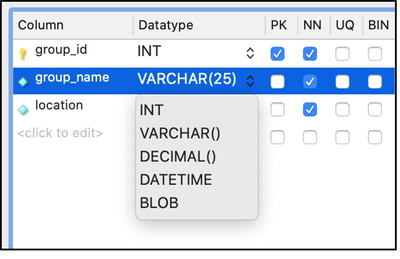
What about group_name? Here's what I'd ask myself. Is there a set number of group names to choose from? Or did the groups get to come up with their own group name? Is there a limit to how long the or short the group name has to be? Can it be any character or will there just be group numbers? If I came up with the answers that the groups can name themselves whatever they want and there is no limit to how long or short the name must be within reason. And since they can name their group whatever they want, I am assuming it can be any characters, not just numbers.
So, when choosing from all the different datatypes available, VARCHAR or variable character makes the most sense. The drop down has many different options. We don't go over all of them in this course, but we will look at most of the common datatypes.
Let's look at gender. For us, we will require either the student is male or female, no other options. Therefore, ENUM or enumerated is a good choice for us. We can only choose one or the other not both. What is also nice about ENUM is that you can restrict exactly how that is typed into the database. What if one data entry person types the word all the way out like 'male' or 'female'. And another puts a lowercase 'm' or 'f'. Putting out actually options inside the parenthesis limits the data entry person to an uppercase 'M' or 'F', that's it.
dist_category and worry_category might also fit well with ENUM. There were only so many categories to choose from on our data gathering sheets. I am purposely going to have the worry category be VARCHAR to illustrate potential problems or benefits with this type of data in a later lesson.
Here's some actual data that you might see in these tables. Notice how the column names that go vertically in the ERD, are now horizontal across the top of the table.
| group_id | group_name | location |
|---|---|---|
| 1 | Zac | back_middle_1 |
| 2 | Name | middle_right_2 |
| 3 | The Great Emu War | middle_left_2 |
| 4 | MIDR | middle_right_1 |
| 5 | DATA YO-YO | front_left_2 |
| 6 | The Snacks | front_middle_2 |
| 7 | Group | back_right_2 |
| 8 | Uno Players | front_left_1 |
| 9 | Team Legit | middle_middle_1 |
| student_id | lname | fname | gender | major | dist_category | worry_category | group_id |
|---|---|---|---|---|---|---|---|
| 1 | Spencer | Sam | M | Data Science | someone | Work/Study | 1 |
| 2 | Jones | Joshua | M | Data Science | someone | My Partner | 1 |
| 3 | Larsen | Lincoln | M | Accounting | digital | Work/Study | 1 |
| 4 | Adams | Andrew | M | Finance | social media | Work/Study | 1 |
| 5 | Victor | Vivian | F | Bioinformatics | someone | Work | 2 |
| 6 | Hector | Jose | M | Business Management | social media | Family | 2 |
| 7 | Daniels | Drew | M | CIT | internet | Finances | 2 |
| 8 | Michaels | Matthew | M | Business Management | internet | School | 2 |
| 9 | Kearns | Kien | M | Software Engineering | internet | Future | 2 |
| 10 | Andersen | Austin | M | CIT | other | Finances | 2 |
| 11 | Butler | Buck | M | Finance | digital | World issues | 1 |
| 12 | Taylor | Trevor | M | Economics | internet | Work/Study | 3 |
| 13 | Andrews | Addison | M | Business Analytics | someone | Work/Study | 3 |
| 14 | Kelly | Kaelan | M | Data Science | social media | My Partner | 3 |
| 15 | Cornelison | Connor | M | Economics | internet | Myself | 3 |
| 16 | Thompson | Thomas | M | Financial Economics | other | Work/Study | 3 |
| 17 | Madsen | Matthew | M | Geology | someone | Work/Study | 3 |
| 18 | Hall | Halla | F | Business Management | social media | Photo/Media | 4 |
| 19 | Smith | Sarah | F | Business Management | digital | Notes/Tracking | 4 |
| 20 | Hansen | Henry | M | Software Engineering | social media | Games | 4 |
| 21 | Stanley | Seth | M | Data Science | digital | Streaming | 4 |
| 22 | Ellison | Eria | F | Computer Science | internet | Unused | 4 |
| 23 | Dye | Dev | M | CIT | internet | Social Media | 4 |
| 24 | Nathaniel | Natalie | F | Financial Economics | someone | Work/Study | 5 |
| 25 | Stevenson | Steven | M | Business Analytics | someone | Family | 5 |
Notice here how the distraction category is restricted to only the categories that were represented on the gathering sheets, but since we left the worry category as VARCHAR there are a few entries that don't quite fit what was on the sheet, like 'Future' or 'Unused'. This was not one of the worry categories. We will see how this works when we start asking questions of our data or querying the data. You will see an overview this week of querying this database.
| image_id | location | type | student_id |
|---|---|---|---|
| 1 | School | documentation | 1 |
| 2 | School | documentation | 1 |
| 3 | School | documentation | 1 |
| 4 | School | documentation | 1 |
| 5 | School | documentation | 1 |
| 6 | School | documentation | 1 |
| 7 | School | documentation | 1 |
| 8 | School | documentation | 1 |
| 9 | School | documentation | 1 |
| 10 | School | documentation | 1 |
| 11 | School | documentation | 1 |
| 12 | School | documentation | 1 |
| 13 | School | documentation | 1 |
| 14 | Home | documentation | 1 |
| 15 | Home | documentation | 1 |
| 16 | Social Setting | group | 1 |
| 17 | Social Setting | group | 1 |
| 18 | Work | selfie | 1 |
| 19 | Work | selfie | 1 |
| 20 | Other | documentation | 1 |
| 21 | Social Setting | group | 2 |
| 22 | Social Setting | group | 2 |
Submission
You will report your progress on the quiz after the third activity.
Useful Links:
- Go to: Week Index • Course Home • Canvas