Don't Sell Yourself Short
Coding and Data Science is hard. Most of what I'm going to put here, you could look up on your own from official docs, tutorials, and Stack Overflow questions.
As we proceed throughout the semester, you'll get fewer hints and be expected to look more stuff up on your own.
If you haven't tried independent research yet, you might want to try that for a few hours, then come back here.
Running Your Colab on Your Own Computer
Using the free google resources can run out when testing models on the GPU instances. There are several ways to run your notebooks using Colab on your own computers. Here are some instructions that might work for you.
Windows Installation Instructions
1. Install Windows Subsystem for Linux (v2)
Use Powershell to run the following command:
wsl --install
Open up WSL from the Start menu
2. Make a folder for you colab data
mkdir colab
cd colab
3. Create a python virtual environment
python3 -m venv .venv
4. Activate the python virtual environment
source .venv/bin/activate
5. Install Tensorflow
With GPU support (NVIDIA GPUs only)
pip install 'tensorflow[and-cuda]'
With CPU only
pip install tensorflow
6. Test that Tensorflow is installed
python3 -c "import tensorflow as tf; print(tf.config.list_physical_devices('GPU'))"
This should show the GPU if your GPU is installed correctly
7. Install remaining packages for this module
pip install matplotlib
pip install scikit-learn
pip install notebook
Mac Installation Instructions (Apple Silicon only M1, M2, M3, ...)
1. Make a folder for you colab data
mkdir colab
cd colab
2. Create a python virtual environment
python3 -m venv .venv
3. Activate the python virtual environment
source .venv/bin/activate
4. Install Tensorflow with macos support
pip install tensorflow-macos
pip install tensorflow-metal
5. Test that Tensorflow is installed
python3 -c "import tensorflow as tf; print(tf.config.list_physical_devices('GPU'))"
This should show the GPU
6. Install remaining packages for this module
pip install matplotlib
pip install scikit-learn
pip install notebook
Running Instructions
1. Navigate to your colab directory
cd colab
3. Activate the python virtual environment
source .venv/bin/activate
4. Run jupyter notebook
jupyter notebook
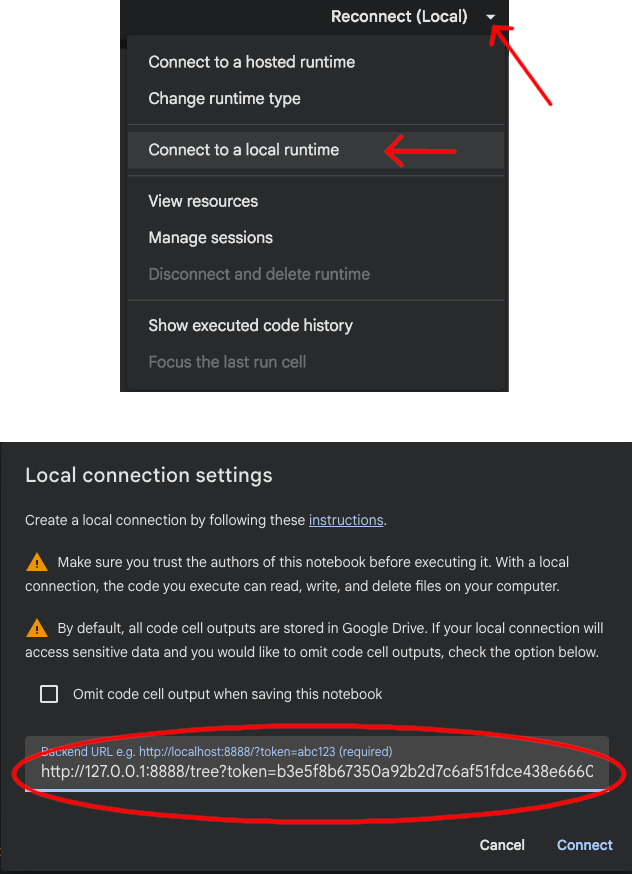
5. Copy the localhost URL including token to put in Colab