
W04 Learning Activity: Sessions and Flash Messages
Overview
In this activity, you will learn how to implement sessions and flash messages in your web application. Sessions allow you to store user-specific data across multiple requests, while flash messages provide a way to display temporary messages to users, such as success or error notifications.
Preparation Material
Web Application Sessions and Session Storage
When you log into a website like Gmail or Instagram, you expect to stay logged in as you navigate between pages, refresh the browser, or even close and reopen tabs within a reasonable time period. This seamless experience depends on a fundamental web technology called sessions. Understanding how sessions work is essential before building authentication systems, user dashboards, shopping carts, and other features that require remembering user state.
The Problem with Stateless HTTP
To understand why sessions are necessary, you need to understand a fundamental characteristic of HTTP: it is stateless. This means that each HTTP request is completely independent of every other request. When your browser sends a request to a web server, the server processes that single request and sends back a response, but it has no memory of previous requests from the same user.
Think of HTTP requests like interactions with a cashier who cannot remember hardly anything. Every time you approach the counter, you have to reintroduce yourself and explain what you want, even if you just spoke to them five seconds ago. The cashier handles your current request perfectly well, but they have no memory of previous interactions. This works fine for simple transactions, but imagine trying to build a relationship or maintain a conversation under these conditions.
This stateless nature is very important for the scalability and simplicity of the web, but it creates significant problems for web applications. Without some way to remember users between requests, every single page visit would require users to log in again. Shopping carts would empty every time users navigated to a new page. Personalized dashboards could not exist. Any feature that depends on knowing who the user is or what they have done previously becomes impossible to implement.
Why HTTP Was Designed to Be Stateless?
HTTP was originally designed for simple document sharing, where each request was independent by design. This stateless approach made servers simpler and more scalable, since they did not need to track information about individual users. However, as the web evolved from static document sharing to interactive applications, the need to maintain user state became essential.
What Are Sessions?
Sessions provide a solution to HTTP's stateless nature by creating a way for web servers to recognize and remember users across multiple requests. A session is essentially a temporary relationship between a user's browser and a web server that persists for a defined period of time. During this relationship, the server can associate data with that specific user and maintain that association across multiple page visits.
Sessions work through a simple but powerful mechanism. When a user first visits a website, the server generates a unique session identifier (often called a session ID or session token). This identifier acts like a claim ticket at a coat check. The server gives the browser this unique ticket, and the browser then gives it back to the server with every subsequent request. When the server receives a request with a session ID, it can look up the associated data and remember everything it needs to know about that user.
The session ID itself is typically a long, random string that looks something like this: a7f2b9c8e1d4f6a3b5c7e9f1a2b4c6d8. This identifier needs to be unique and unpredictable to prevent users from guessing other people's session IDs. The server stores this identifier along with any data it wants to associate with that user's session.
Session Lifecycle and Management
Sessions follow a predictable lifecycle that includes creation, usage, expiration, and destruction. Understanding this lifecycle is crucial for building reliable web applications that handle user state appropriately.
Session Creation
Sessions are typically created when a user first visits a website or performs an action that requires state tracking, such as logging in or adding an item to a shopping cart. The server generates a unique session ID and sends it to the browser, usually through a cookie. The browser automatically includes this cookie in all subsequent requests to the same domain.
Session Usage
Once a session exists, the server can associate data with that session ID. This data might include user authentication status, shopping cart contents, user preferences, or any other information the application needs to remember. Each time the user makes a request, the server uses the session ID to retrieve this stored data and can modify it as needed.
Session Expiration
Sessions cannot persist forever, both for security reasons and to prevent servers from becoming overwhelmed with old session data. Sessions typically expire in two ways: through inactivity timeouts and absolute timeouts. Inactivity timeouts reset the expiration time each time the user makes a request, while absolute timeouts set a maximum session duration regardless of activity.
Session Destruction
Sessions end when they expire naturally, when users explicitly log out, or when the server deliberately destroys them for security reasons. When a session is destroyed, the server removes all associated data, and subsequent requests with that session ID are treated as invalid.
Session Security Considerations
Session IDs are sensitive data that must be protected. If an attacker obtains someone's session ID, they can impersonate that user until the session expires. This is why session IDs should be transmitted over HTTPS, stored securely, and rotated regularly, especially after authentication events.
Session Storage Options
Session data can be stored in several different ways, each with its own trade-offs in terms of performance, scalability, and persistence. The most common are in-memory storage, file system storage, and database storage.
In future activities, you will learn more about these tradeoffs and set up database session storage. But at this point, you will keep things simple and use in-memory session storage, which works great for the flash messages you will be saving.
Also, in the future, you will use sessions for critical functionality such as login management and user authentication. But for this activity, you will start by using sessions to handle saving simple messages for a short period of time.
The Post-Redirect-Get Pattern
When a user submits a POST request, such as when submitting a form, the server could send them back a response directly. However, this can lead to problems if the user refreshes the page, as the browser will attempt to resubmit the POST request, potentially causing duplicate submissions.
To avoid this issue, web applications often use the Post-Redirect-Get (PRG) pattern. In this pattern, after processing a POST request, the server processes the data and then redirects the user to a new page using a GET request. This pattern helps prevent duplicate form submissions if the user refreshes the page.
This pattern causes two round trips to the server. First, the client submits the POST request, and the response they get back is a redirect to a new URL. This is accomplished by sending by a 300 level HTTP status code along with a Location header indicating the URL to redirect to.
When the client receives this redirect response, it automatically makes a GET request to the URL specified in the Location header. The server then sends back the desired content for that URL.
The following figure depicts this process:
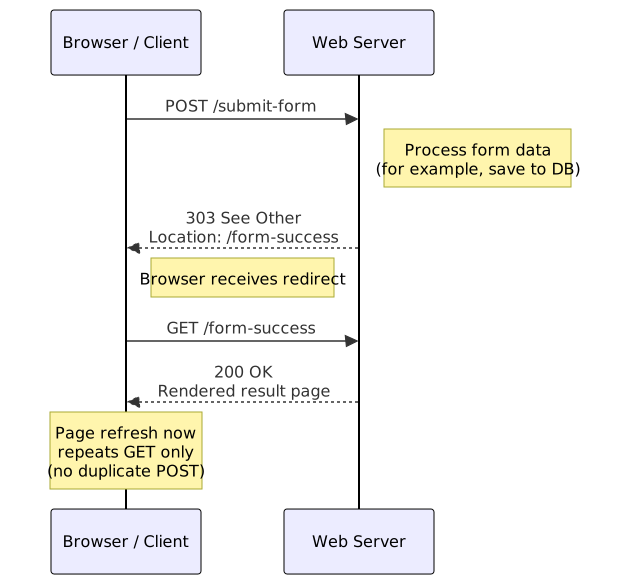
To accomplish this process, you use code similar to the following:
// Handle POST request
app.post('/submit-form', (req, res) => {
    // Process form data here
    // ...

    // Redirect to another page
    res.redirect('/form-success');
});

// Handle GET request for the redirected page
app.get('/form-success', (req, res) => {
    res.render('success-page');
});
Notice that in this example, the POST handler does not contain a res.render() call to render a page. Instead, the POST handler redirects to a new URL, and the GET handler for that URL is responsible for rendering the page.
Because the browser handles the redirect directly, the user never sees the response to the POST request. Instead, they see the response to the subsequent GET request, and they may not even be aware that two round trips happened.
A Common Problem: Losing Messages After Redirects
The Post-Redirect-Get (PRG) pattern, is a best practice for handling form submissions, because it prevents duplicate form submissions if users refresh their browser. However, this pattern creates a significant challenge.
Imagine a user registers for an account. Your server validates the data, creates the account in the database, and then redirects to the login page. How do you tell the user their registration was successful? You cannot simply pass a variable like success: true because the redirect causes a completely new HTTP request. Any data you attached to the response from the registration handler is lost when the browser makes the new GET request to the login page.
The Solution: Session-Based Temporary Storage
One solution to this problem is to use session storage as a temporary holding area for a flash message—a message that is displayed once and then goes away. The concept is elegant: when your controller needs to display a message after a redirect, it stores the message in the user's session before redirecting. When the next page renders, it retrieves the message from the session, displays it to the user, and immediately deletes it from the session.
Flash Messages
Flash messages are temporary notifications that are displayed to users after certain actions, such as form submissions or login attempts. They provide feedback about the success or failure of an operation and disappear after being viewed once. Flash messages enhance user experience by providing immediate, contextual information.
Flash messages are typically implemented using sessions. When an action occurs that requires user feedback, the server stores the message in the user's session. The next time the user makes a request, the server retrieves the message from the session, displays it to the user, and then removes it from the session.
This "flash" behavior is where the name comes from. The message exists briefly, displays once, and then disappears, much like a camera flash. The message survives the redirect because sessions persist across multiple HTTP requests, but it does not survive beyond a single display because the system explicitly removes it after rendering.
The lifecycle of a flash message follows this sequence:
-
The user submits a form to
/submit-form. - The controller processes the form and stores a success message in the session.
-
The controller redirects to
/form-success. -
The browser makes a new GET request to
/form-success. - The controller renders the success page.
- During rendering, the EJS template retrieves flash messages from the session.
- The act of retrieving the messages deletes them from the session.
- The user sees the success message on the success page.
- If the user refreshes, no message appears because it was already shown and deleted.
The Flash Message Data Structure
A well-designed flash message system needs to handle multiple types of messages (success, error, warning, informational) and potentially multiple messages of the same type. A good data structure to supports this is an object where each property name represents a message type, and each value is an array of message strings.
// Structure stored in req.session.flash
{
    success: ['Registration complete!', 'Welcome email sent!'],
    error: ['Invalid password format'],
    warning: [],
    info: []
}
This structure offers several advantages. First, it organizes messages by type, making it easy to style them differently in your templates. Success messages might display with a green background, while errors use red. Second, the array structure naturally supports multiple messages of the same type. If form validation finds three errors, you can store all three and display them together. Third, the structure is extensible. If you later need a new message type like debug or notice, you can add it without changing how the system works.
Working with this structure is deliberately simple. To add a message, you call a function with the type and message text. To retrieve messages, you call the same function with just the type, or with no arguments to get all messages at once. The function handles the complexity of creating arrays, appending messages, and cleaning up empty arrays.
Implementing Flash Messages with Middleware
The flash message system requires two pieces of middleware. The first middleware, which you add early in your middleware stack, initializes the flash storage structure and provides methods for setting and getting messages. The second middleware, which typically runs as part of your global middleware, makes the flash function available to all templates.
Flash Storage Middleware
The storage middleware attaches a flash() method to the request object. This method handles both storing and retrieving messages, using different behavior based on how many arguments it receives.
When called with two arguments (type and message), it stores a new message. The middleware first ensures that req.flash exists and is properly initialized as an object with empty arrays for each message type. It then pushes the new message onto the appropriate type's array. This lazy initialization approach means the flash storage only exists when needed, keeping sessions lean.
When called with one argument (just type), it retrieves all messages of that type, removes them from the session, and returns them as an array. This retrieval-and-deletion behavior is the "flash" mechanism. The messages are consumed by being read, ensuring they only display once.
When called with no arguments, it retrieves all messages of all types, clears the entire flash storage, and returns an object containing all the messages organized by type. This is the most common usage in templates because it allows a single call to get everything that needs to be displayed.
Why Middleware Instead of a Simple Function?
You might wonder why flash messages require middleware rather than a simple utility function. The answer is that middleware has access to both req and res objects and runs automatically on every request. This allows the flash system to initialize storage lazily, attach methods to the request object, and make itself available to templates through res.locals without requiring manual setup in every controller.
Template Access Middleware
The second piece of middleware is simpler but equally important. It makes the req.flash function available to all templates by attaching it to res.locals. The res.locals object is a special Express feature that automatically makes its properties available as variables in all rendered templates.
This middleware must run after the flash storage middleware (so req.flash exists) but before any routes render templates. Typically, you place it in your global middleware file along with other template utilities like copyright year or current user information.
An important detail about this middleware is that it only makes the function available to templates. It does not call the function, which means it does not consume the messages. The messages remain in the session until a template actually renders and calls flash(). This is crucial for the redirect scenario. When a controller redirects, the template access middleware runs, but no template renders, so the messages survive. Only when the redirected-to route renders its template do the messages get consumed and deleted.
Activity Instructions
In this activity, you will implement the following features:
- Set up in-memory session storage.
- Implement flash message middleware to make flash messages available to set and retrieve.
- Add flash messages to the create new organization form that you created earlier.
Set up in-memory session storage
To get started with flash messages, you first need to set up session management in your Express application. For this activity, you will use in-memory session storage, which is suitable for development and testing purposes.
-
First, install the
express-sessionpackage. In a terminal window, run the following command in your project directory: - Generate a secure session secret by running the following command in your terminal, then copy the generated value into your
.envfile asSESSION_SECRET.- Run the following command in the terminal:
node -e "console.log(require('crypto').randomBytes(64).toString('hex'))" - Then, copy and paste the secret that was generated and add it to your
.envfile as shown: - Add this same environment variable at Render.com by opening your Render dashboard, selecting your web service, going to the environment variable settings, and adding
SESSION_SECRETwith your secret value. -
Next, open your main
server.jsfile so you can configure the session middleware in your Express app. - Add an
importstatement forexpress-sessionat the top of yourserver.jsfile. - In your
server.jsfile, load the session secret from your environment variables: - In your
server.jsfile, At the beginning of your middleware section (before your other middleware functions), use thesessionmiddleware in your Express app as follows:
npm install express-sessionSESSION_SECRET=your_generated_secret_hereimport session from 'express-session';const SESSION_SECRET = process.env.SESSION_SECRET;// Set up session management
app.use(session({
secret: SESSION_SECRET,
resave: false,
saveUninitialized: true,
cookie: { maxAge: 60 * 60 * 1000 } // Session expires after 1 hour of inactivity
}));
This code sets up session management with a secret key for signing the session ID cookie. The resave and saveUninitialized options control session saving behavior, and the cookie.maxAge option sets the session expiration time.
You can now access session data via req.session in your routes and middleware.
Secret Key
Keep your SESSION_SECRET private and never commit your .env file to version control.
Implement Flash Message middleware
Next, you will implement the flash message middleware that provides the req.flash() function for storing and retrieving flash messages.
- Create a new file named
flash.jsin a new directory calledsrc/middleware. - Add the following code to
flash.jsto implement the flash message storage middleware: - In your main
server.jsfile, import the flash middleware at the top: - Then, in your
server.jsfile, use the flash middleware in your Express app. Include the following code directly after the session middleware but before your other middleware.
/**
 * Flash Message Middleware
 *
 * Provides temporary message storage that survives redirects but is consumed on render.
 * Messages are stored in the session and organized by type (success, error, warning, info).
 *
 * Usage in controllers:
 *   req.flash('success', 'Message text')  // Store a message
 *   req.flash('error')                    // Get all error messages
 *   req.flash()                           // Get all messages (all types)
 */

/**
 * Initialize flash message storage and provide access methods
 */
const flashMiddleware = (req, res, next) => {
    /**
     * The flash function handles both setting and getting messages
     * - Called with 2 args (type, message): stores a new message
     * - Called with 1 arg (type): retrieves and clears messages of that type
     * - Called with 0 args: retrieves and clears all messages
     */
    req.flash = function(type, message) {
        // Initialize flash storage if it doesn't exist
        if (!req.session.flash) {
            req.session.flash = {
                success: [],
                error: [],
                warning: [],
                info: []
            };
        }

        // SETTING: Two arguments means we're storing a new message
        if (type && message) {
            // Ensure this message type's array exists
            if (!req.session.flash[type]) {
                req.session.flash[type] = [];
            }
            // Add the message to the appropriate type array
            req.session.flash[type].push(message);
            return;
        }

        // GETTING ONE TYPE: One argument means retrieve messages of that type
        if (type && !message) {
            const messages = req.session.flash[type] || [];
            // Clear this type's messages after retrieving
            req.session.flash[type] = [];
            return messages;
        }

        // GETTING ALL: No arguments means retrieve all message types
        const allMessages = req.session.flash || {
            success: [],
            error: [],
            warning: [],
            info: []
        };

        // Clear all flash messages after retrieving
        req.session.flash = {
            success: [],
            error: [],
            warning: [],
            info: []
        };

        return allMessages;
    };

    next();
}

/**
 * Make flash function available to all templates via res.locals
 * This middleware must run AFTER flashMiddleware
 */
const flashLocals = (req, res, next) => {
    // Attach the flash function to res.locals so templates can access it
    // The function is NOT called here, just made available
    // Messages are only consumed when a template calls flash()
    res.locals.flash = req.flash;
    next();
}

/**
 * Combined flash middleware that runs both functions in the correct order
 * Import and use this as a single middleware function in your application
 */
const flash = (req, res, next) => {
    flashMiddleware(req, res, () => {
        flashLocals(req, res, next);
    });
};

export default flash;
import flash from './src/middleware/flash.js';// Use flash message middleware
app.use(flash);
You can now call req.flash() in your controllers to set flash messages, and call flash() in your templates to retrieve and display them.
Add Flash Messages to the Create New Organization Form
Next, you will enhance the create new organization form by adding flash messages to provide user feedback after form submission.
- Open the
src/controllers/organizations.jscontroller file that handles the POST request for creating a new organization. - In the POST handler, after processing the form data, use
req.flash()to store a success message before redirecting. Your controller should now look something like the following:
const processNewOrganizationForm = async (req, res) => {
    const { name, description, contactEmail } = req.body;
    const logoFilename = 'placeholder-logo.png'; // Use the placeholder logo for all new organizations

    const organizationId = await createOrganization(name, description, contactEmail, logoFilename);

    // Set a success flash message
    req.flash('success', 'Organization added successfully!');

    res.redirect(`/organization/${organizationId}`);
};
Display Flash Messages in your EJS header template
Now that you have saved a new flash message, you need to update your EJS template code to retrieve and display it.
You could include this code on each page where it seems applicable (such as a page that renders after a form submission), but a more efficient approach is to add it to a common header or layout template that is included on all pages. This way, flash messages will be displayed consistently across your entire application without duplicating code.
- Open your common header file:
src/views/partials/header.ejs. - At the bottom of this file, after your navigation bar or main header content, add code to retrieve and display any flash messages. Include the following code:
- Add CSS styles for flash messages to your main stylesheet
src/public/css/main.cssto visually distinguish different types of messages such as success, error, or warning. You can use AI to generate some for you, or you can use the following:
    <% const messages = flash(); %>
    <% Object.keys(messages).forEach(type => { %>
        <% if (messages[type].length > 0) { %>

                <% messages[type].forEach(msg => { %>
                    <%= msg %>
                <% }); %>

        <% } %>
    <% }); %>
/* Flash message styles */
.alert {
    padding: 15px;
    margin-bottom: 20px;
    border: 1px solid transparent;
    border-radius: 4px;
}
.alert.success {
    color: #155724;
    background-color: #d4edda;
    border-color: #c3e6cb;
}
.alert.error {
    color: #721c24;
    background-color: #f8d7da;
    border-color: #f5c6cb;
}
.alert.warning {
    color: #856404;
    background-color: #fff3cd;
    border-color: #ffeeba;
}
.alert.info {
    color: #0c5460;
    background-color: #d1ecf1;
    border-color: #bee5eb;
}
Now, each page will automatically check for any flash messages stored in the session, display the messages, and then clear them from the session, providing consistent user feedback across your application.
Test your flash messages
Now that everything is in place, test your flash messages by submitting the create new organization form and verifying that the success message appears as expected.
- Start your Express server if it is not already running.
- Open your web browser and navigate to the create new organization form page.
- Fill out the form with valid data and submit it.
- After submission, you should be redirected to the organization details page, and you should see the success flash message displayed at the top of the page.
- Refresh the page to ensure that the flash message disappears after being displayed once.
In a future activity, you will set up server-side validation rules and send appropriate flash messages for validation errors.
Next Step
Complete the other Week 04 Learning Activities
After you have completed all the learning activities for this lesson, return to Canvas to submit a quiz.
Other Links:
- Return to: Week Overview | Course Home