
W01 Learning Activity: Server-side Fundamentals
Overview
In this activity, you will learn the fundamentals of server-side development, including how servers handle requests and responses.
Preparation Material
Request response lifecycle
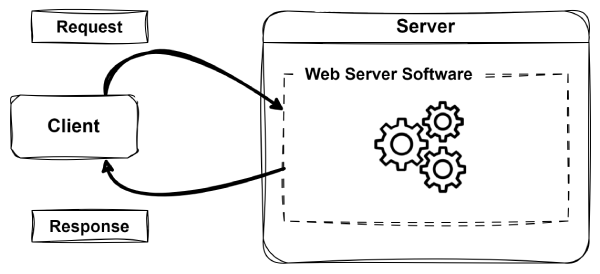
The Request-Response Life Cycle is the fundamental process by which web applications work. It describes how a user's request is sent to a server and how the server processes and responds to that request. At a high level, clients (like web browsers) send out a request to a server, which then processes the request and sends back a response (like an HTML page). This is what it looks like in a simple diagram:
A Deeper Dive
The request-response cycle is a foundational concept in web development. It defines how users interact with web applications and how servers deliver the appropriate content. Understanding this process is essential, as it forms the basis for everything you will build and debug in this course.
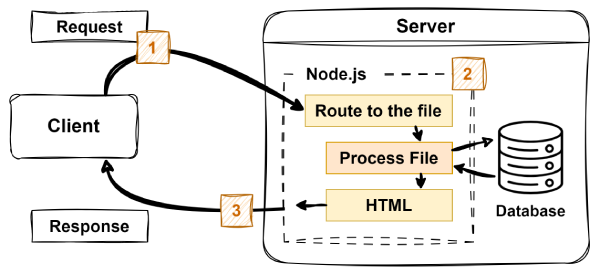
The following are the key steps involved in the request-response cycle:
-
User Makes a Request
- A user interacts with a web application (for example, by clicking a link or submitting a form).
-
The browser sends an HTTP request to the web server which includes information including:
- The URL.
- HTTP method (such as GET or POST).
- Any data being sent.
-
Server Processes the Request
- The web server software receives the request and determines how to handle it (This server software could be Apache, Nginx, or Node.js, or others).
- If necessary, the server may interact with a database or other services to gather data.
- The server prepares a response (for example, an HTML page, JSON data, or an error message).
-
Response is Sent Back
- The server sends an HTTP response back to the user's browser.
- The response may contain HTML, CSS, JavaScript, or other content.
-
Browser Displays the Response
- The browser receives and renders the response, updating the webpage accordingly.
HTTP Request and Response Headers
HTTP headers are key-value pairs sent between the client and server that provide essential information about the request or response. They help both parties understand how to process the data being exchanged.
Common HTTP request headers include:
- Host: Specifies the domain name of the server (for example, www.example.com).
- User-Agent: Identifies the client software making the request (for example, browser type and version).
- Accept: Indicates the types of content the client can process (for example, text/html, application/json).
- Content-Type: Specifies the media type of the request body (for example, application/json for JSON data).
Common HTTP response headers include:
- Content-Type: Indicates the media type of the response body (for example, text/html for HTML content).
- Content-Length: Specifies the size of the response body in bytes.
- Set-Cookie: Used to send cookies from the server to the client.
- Cache-Control: Directives for caching mechanisms in both requests and responses.
HTTP Verbs and Status Codes
HTTP verbs (also known as methods) indicate the desired action to be performed on a resource. The following are the most common HTTP verbs:
- GET: Retrieve data from the server.
- POST: Submit data to be processed to the server.
- PUT: Update an existing resource on the server.
- DELETE: Remove a resource from the server.
HTTP status codes are three-digit codes returned by the server to indicate the result of the request. Common status codes include the following:
- 200 OK: The request was successful.
- 201 Created: A new resource has been created successfully.
- 400 Bad Request: The server could not understand the request due to invalid syntax.
- 401 Unauthorized: Authentication is required to access the resource.
- 404 Not Found: The requested resource could not be found.
- 500 Internal Server Error: The server encountered an unexpected condition that prevented it from fulfilling the request.
The Job of the Server
The server's primary job is to handle incoming requests from clients, process those requests, and send back appropriate responses. In the most simple case, this could be locating a file on the server and sending it back to the client. In more complex scenarios, however, the server will be running a program that generates the page to send back. This could involve querying a database, processing user input, or performing calculations.
In your previous courses, almost everything you did with servers was focused on retrieving files. This course will be very different. In this course you will learn how to run programs on the server to generate the content that is returned.
Running Programs to Generate Content
This course will focus on running programs on the server that will generate content to return to the client.
You will use JavaScript as the programming language and Node.js is the engine that will run your JavaScript programs on the server.
It is critical to understand that your JavaScript programs will run on the server, and then they will be finished. The client will never see your JavaScript files. They will only see the output of those files.
Activity Instructions
For this activity, you will use the developer tools of your browser to learn more about the requests and responses that your browser is sending and receiving as you browse the web.
Complete the following steps:
- Open your web browser (such as Chrome, Firefox, or Edge).
- Navigate to any website of your choice.
- Open the developer tools in your browser. This is usually done by right-clicking on the page and selecting "Inspect" or by pressing F12.
- Go to the "Network" tab in the developer tools.
- Refresh the webpage to see all the network requests being made.
- Click on one of the requests in the list to view its details.
- Examine the request headers and response headers to see what information is being sent and received.
- Look for the HTTP method used (GET, POST, etc.) and the status code returned by the server (200, 404, etc.).
- Take note of any interesting headers or information you find.
- Repeat the process for a few different requests to get a better understanding of how the request-response cycle works.
Submission
After you have completed all the learning activities for this lesson, return to Canvas to submit a quiz.
Other Links:
- Return to: Week Overview | Course Home