The Request Response Lifecycle
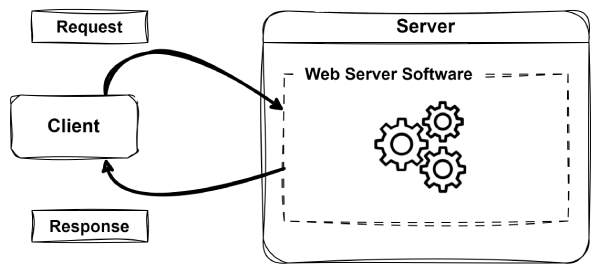
The Request-Response Life Cycle is the fundamental process by which web applications work. It describes how a user's request is sent to a server and how the server processes and responds to that request. At a high level, clients (like web browsers) send out a request to a server, which then processes the request and sends back a response (like an HTML page). This is what it looks like in a simple diagram:
A Deeper Dive
The request-response cycle is a foundational concept in web development. It underpins how users interact with web applications and how servers deliver the appropriate content. Understanding this process is essential, as it forms the basis for everything you will build and debug in this course.
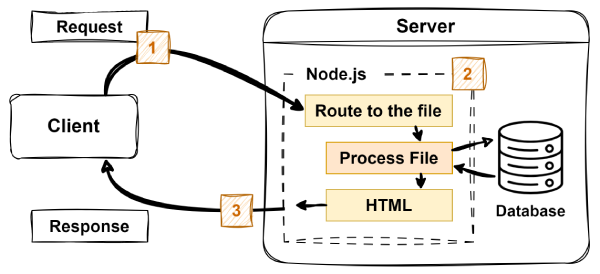
To better understand how it works, let us break down the request-response lifecycle into its key steps:
-
User Makes a Request
-
A user interacts with a web application (e.g., by clicking a link or submitting a form).
-
The browser sends an HTTP request to the web server which includes information like:
- The URL.
- HTTP method (GET, POST, etc.).
- Any data being sent.
-
Server Processes the Request
-
The web server software (application) receives the request and determines how to handle it (e.g., Apache, Nginx, or Node.js).
-
If necessary, the server may interact with a database or other services to gather data.
-
The server prepares a response (e.g., an HTML page, JSON data, or an error message).
-
Response is Sent Back
-
The server sends an HTTP response back to the user's browser.
-
The response may contain HTML, CSS, JavaScript, or other content.
-
Browser Displays the Response
-
The browser receives and renders the response, updating the webpage accordingly.
Middleware in Express
In modern web development, especially when working with Node.js and Express, middleware is an essential building block for handling HTTP requests. Middleware functions enable developers to define and control the flow of requests and responses through their applications. Without middleware, every route would need to manually handle repetitive tasks like logging, authentication, and error checking.
Middleware creates a processing pipeline where each function performs a specific task and either ends the cycle or passes control to the next function in the stack. This modular approach makes your code more maintainable, flexible, and easier to debug.
What is Middleware?
Middleware in Express is any function that has access to the request (req) object, the response (res) object, and the next() function in the application's request-response cycle. These functions are executed in order, and each one can inspect or modify the request and response objects, end the cycle, or delegate control to the next function.
A middleware function in Express has the following signature:
            (req, res, next) => {
                // Your logic here
            }
Middleware functions are commonly used for tasks such as:
- Logging incoming requests
- Checking authentication and authorization
- Parsing request bodies
- Serving static files
- Handling errors globally
Middleware in Action
The following example demonstrates two middleware functions, one for logging requests and another for handling authentication:
            // Middleware that logs request information
            app.use((req, res, next) => {
                console.log(`${req.method} ${req.url}`);
                next();  // Pass control to the next middleware
            });

            // Authentication middleware
            app.use((req, res, next) => {
                if (!req.session.user) {
                    // Stop here, redirect to login
                    res.redirect('/login');
                    return;
                }

                // User is authenticated, continue to the next middleware
                next();
            });
The first function logs the HTTP method and path for every request. It then calls next(), which ensures that the request moves on to the next middleware function. The second function checks whether the user is authenticated. If not, it ends the request-response cycle early by redirecting the user to a login page.
Controlling the Flow with next()
The next() function is what links each middleware function to the next. If a middleware function calls next(), the next function in the stack is executed. If it sends a response (e.g., res.send() or res.redirect()) the cycle ends there; you should not call next() after sending a response.
This mechanism allows you to write expressive, layered logic. For example, you can have one middleware function that sets up a user object, another that verifies permissions, and a third that handles the actual business logic for the requested route.
Middleware and the Request-Response Lifecycle
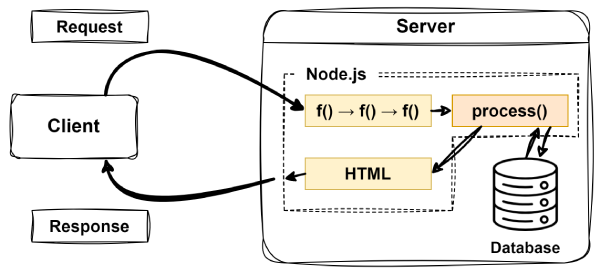
Middleware functions — f() in this example — are executed in the order they are defined in your application. When a request comes in, Express processes it by running each middleware function in sequence. If a middleware function does not call next(), the cycle stops, and the current response (if any) is sent back to the client.
Ideally, middleware functions will eventually lead to a specialized middleware known as a route handler — process() in this example. Route handlers are the functions that generate the actual response to the client based on the request. Here is a simplified diagram of how middleware fits into the request-response lifecycle:
Routing in Express
After middleware prepares or filters an incoming request, the next crucial step is determining how to respond. This is where routing comes into play. Routing is the process of mapping incoming HTTP requests to the specific code that handles them. In Express, routes define how your application responds to different endpoints and HTTP methods.
Every route in an Express application is essentially a combination of two things:
- An HTTP method (such as GET, POST, PUT, or DELETE)
- A URL path or pattern (such as
'/' or '/users/:id')
When a request matches both the method and the path of a defined route, Express runs the associated handler function to generate the response.
Defining Routes in Express
Routes are typically defined using methods like app.get(), app.post(), app.put(), and app.delete(). Each of these corresponds to an HTTP method and takes two main arguments, the path to match and a function to handle the request:
            app.get('/', (req, res) => {
                res.send('Welcome to the Home Page!');
            });

            app.get('/about', (req, res) => {
                res.send('This is the About Page.');
            });

            app.post('/submit', (req, res) => {
                res.send('Form Submitted!');
            });
In this example:
-
app.get() is used for handling HTTP GET requests, commonly used to retrieve data or display pages.
-
app.post() handles HTTP POST requests, which are typically used to send data to the server (such as submitting a form).
-
The second argument to each route function is a callback that receives
req (the request) and res (the response) objects.
-
The logic within each handler determines what response is sent back to the client.
This course focuses on introducing the foundational concepts of server-side rendered web applications. Advanced topics, such as RESTful APIs, will be explored in subsequent courses. For now, you will primarily work with the GET (app.get()) and POST (app.post()) methods. Avoid using API-specific methods like PUT and DELETE, as they are beyond the scope of this course.
Dynamic Routing and Parameters
Routes can also be dynamic, allowing you to handle requests with variable data in the path. For example:
            app.get('/users/:id', (req, res) => {
                const userId = req.params.id;
                res.send(`User ID: ${userId}`);
            });
Here, the :id in the path acts as a placeholder. When a request is made to /users/123, req.params.id would contain the value "123". This is useful because the id number allows you to identify and retrieve specific resources or data. For example, you could use this to display a profile page for a specific user, fetch details of a particular blog post, or retrieve product information, all based on the dynamic part of the URL.
Routing Order and Middleware Integration
Routes in Express are matched in the order they are defined. Once a match is found, no further routes are checked unless next() is called explicitly within the route handler. This makes route order important, especially when working with route-specific middleware or catch-all routes.
Middleware can be attached to specific routes to perform tasks like authentication, logging, or data validation before the route handler actually runs. This allows you to build layered logic with fine-grained control.
Routing and the Request-Response Lifecycle
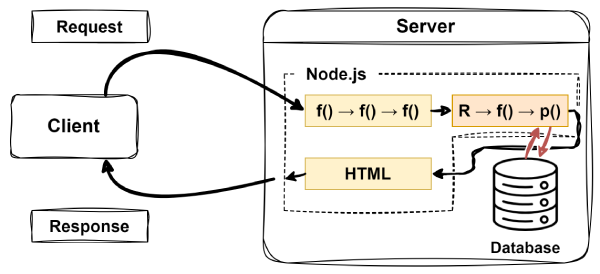
In the request-response lifecycle, routing serves as the mechanism that maps incoming requests to the appropriate code for generating a response. Express evaluates each request by matching its HTTP method and path against the defined routes. When a match is found, the corresponding handler function is executed to process the request and generate a response. If no route matches, it is essential to handle this scenario by responding with a 404 Not Found status. This can be achieved using a special error-handling route, which will be discussed in more detail later in the course.
Here is a simplified diagram showing how routing fits into the request-response lifecycle. Key elements include:
-
f() middleware functions that the request passes through before reaching a specific route handler.
-
R the route handler that processes the matched request, possibly protected by route specific middleware f().
-
p() the route handler finally generates the response to be sent back to the client.
Next Steps
To deepen your understanding of how routing and middleware work, especially in relation to the Express framework, explore the following resources:
As you read these guides, try experimenting with the provided code examples to observe how routing and middleware function in various scenarios. Additionally, explore other resources such as videos or articles that explain these concepts in different ways. If you use AI tools, please use ChatGPT so you can easily share a transcript of your conversation.
Reflection Submission
After exploring these concepts, summarize your understanding and highlight any areas you found challenging. Share the resources that helped you grasp these topics, and explain them in your own words. If you used tools like ChatGPT for additional learning, include a transcript of your conversation using the share feature. Additionally, if you discovered a helpful video or article, provide a link to it. Submit your reflection through Canvas, ensuring it is clear, concise, and well-organized.

