W01 Prove: Create Personal Software Portfolio
Overview
What is a Portfolio?
It is often said that if a person wants to become a great piano player, then that person needs to practice the piano. The same can be said for a computer programmer. It is not enough for a student of programming to implement the problem sets given to them during their academic experience. When we interview for a job, the potential employer will be interested in what we have created that is unique from other students. Usually, the best thing to discuss is relevant employment. However, if we are seeking our first job or if we are seeking a job that requires new technical skills, we will need to have something to discuss and showcase. A personal software portfolio is a collection of our creative software work. This portfolio does not contain the solutions to problems that all of our peers solved in previous classes. Rather, this portfolio contains the results of our scientfic experimentation with technology. We should reflect on the scientific process, as shown below:
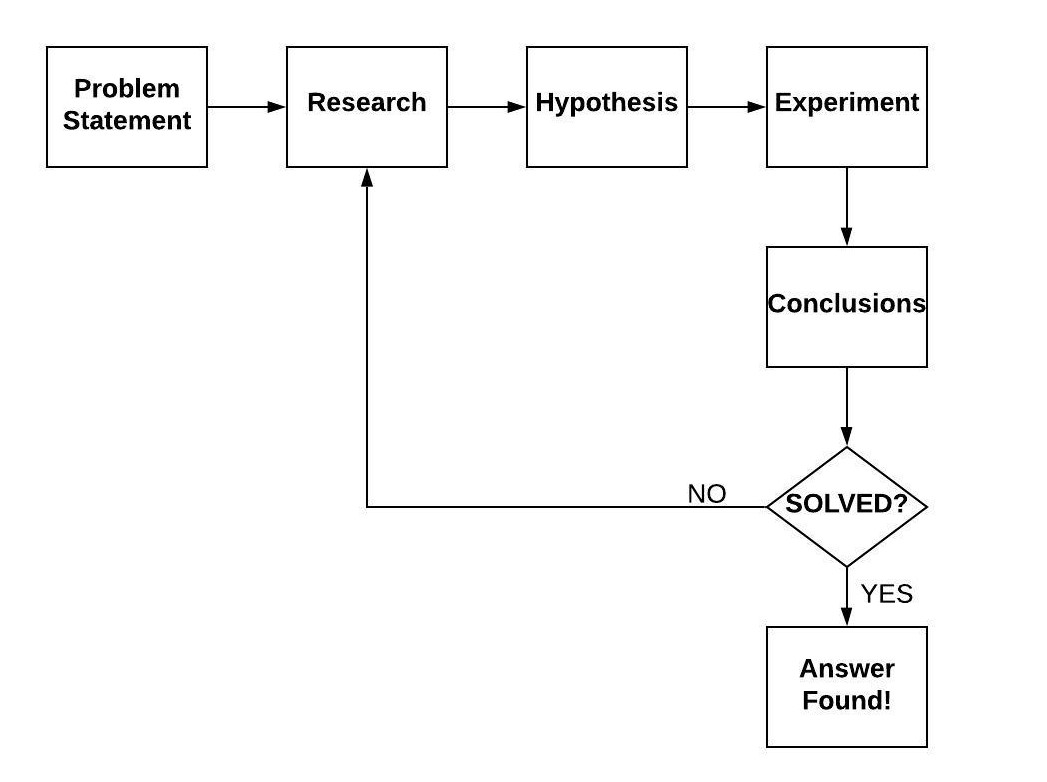
Our portfolio should contain all the software we have created in our effort to either learn new technologies or solve new problems. The code by itself is insufficient when we consider the scientific method; the portfolio must represent the research and conclusions that we have obtained through the process. Each piece of software that we include within our portfolio must have documentation. The documentation serves many purposes, including the following:
-
Potential employers will understand the purpose and scope of our software, including the breadth of knowledge that we have regarding the subject.
-
Other engineers can learn from our work and potentially collaborate with us on improvements.
-
We can recall where we stopped our investigation so that later we can continue with our learning.
Creating a Portfolio
The software we put in our portfolio must be suitable for sharing with everyone. Solutions to specific academic problems and proprietary solutions from our company should not be included. In this course, however, we will be asked to create content that is very appropriate for our portfolio. Everything that we create in this course will be required to be shared in a public repository. The Prove assignment this week will be to establish a well-documented GitHub account. Once our account is established, we will create and add our first piece of software, demonstrating a programming language that we already know. In addition to publishing our code, we will also publish detailed documentation (as a README.md file).
Putting code into GitHub requires the use of the Git program. Visual Studio Code will both detect your Git installation and provide integration. This GitHub Workshop video will walk through the process of creating a “Hello World” program using Python and Visual Studio Code and publishing it within GitHub. Please note that starting in 2021, GitHub requires that you create a Personal Access Token when using the Git tool (as opposed to using your GitHub password). You an learn more about creating the Personal Access Token in the GitHub Docs The first time you try to use Git to access GitHub (either from the command line or Visual Studio Code) you will need to use your Personal Access Token instead of your password.
You can also read more from these websites:
-
Using Version Control in VS Code—Microsoft (official website)
-
Working with GitHub in VS Code—Microsoft (official website)
The use of Visual Studio Code is recommended for most modules in this course. However, you are allowed to use other Integrated Development Environments (IDE). In some modules, you will be guided to use other tools that are better suited for the task. You will need to learn how to integrate with GitHub when other tools are used.
Assignment
Throughout this course you will be adding several pieces of software into your Personal Software Portfolio. In this assignment, you will add you first one (Hello World) to make sure you understand the process. The GitHub Workshop video will walk you through this assignment using Python.
Instructions
-
Create a GitHub Account. If you already have a GitHub account, then you can reuse it for this class.
-
Edit your profile to include a picture, name and brief bio (for example, “Computer Science Student at BYU-Idaho”).
-
Using Visual Studio Code, write a very simple "Hello World" program in any programming language that you already know (e.g. Python, C++, C#, or anything else). The code should be placed in its own folder.
-
Download the following README.md file and put it in the same folder as your code. You always want to put this file at the top of your folder structure so it will be displayed automatically in GitHub. Every module you complete in this course will have its own README.md template to fill out.
-
The README.md file you received is a template written in Markdown language. You need to fill it out completely. Refer to the Markdown Language Cheatsheet for help with the syntax. This file will be publically viewable in GitHub so make sure has good spelling and grammar and is professional.
-
The README.md file will require that you provide a YouTube link to a video about the software you created. For this simple Hello World assignment, create a one minute video that provides a demo of your software and walkthrough of the code. Future videos you do for other modules will be longer. The video should be published publically (or unlisted if desired) on a video sharing site like YouTube. Use the YouTube Upload Videos support page if you need additional instructions.
-
Publish your code (with the README.md) into a public (not private) GitHub repository. You will need to install git to give Visual Studio Code that capability to publish to GitHub.
-
Download the cse310_personal_software_portfolio.docx to provide the link to the public repository you created. There is a checklist in the template that you should complete to ensure that everything has been completed. You will also have to report how much time you spent on this activity. There will be a submission document like this to submit for all the modules you complete in this course.
Rubric
Your first repository will be graded using the following rubric using a 50 point scale:
| Criteria | Points |
|---|---|
| This criterion is linked to a Learning OutcomeThe Hello World program was put into a public GitHub repository. If this is not completed, then a zero will be given on the assignment. | 25 |
| This criterion is linked to a Learning OutcomeThe README.md file has been populated from the correct template, placed at the top level of the repository, and well documents the software created. | 10 |
| The video has been created and provides both a demo of the software running and a detailed walkthrough of the code and how it works. | 10 |
| Hours spent was accurately reported. | 5 |