
CSS Pseudo-Classes
Overview
CSS pseudo-classes let designers respond to an element's state, such as when a user hovers over it, and change its style using only CSS.
"A pseudo-class is a selector that selects elements that are in a specific state, for example they are the first element of their type, or they are being hovered over by the mouse pointer. They tend to act as if you had applied a class to some part of your document, often helping you cut down on excess classes in your markup, and giving you more flexible, maintainable code." – MDN
Common Pseudo-Classes
:hover– the pointer is over the element.:focusand:focus-visible– the element has keyboard or input focus. Never remove focus styles without replacing them; keyboard users rely on them.:linkand:visited– unvisited and visited links.:first-child,:last-child, and:nth-child()– an element's position among its siblings.:not()– elements that do not match the selector in the parentheses.
Prepare
- Reference: 📃 CSS Pseudo-classes – w3schools.com – use the Try It editor to work with the concept.
- Reference: 📃 :root – MDN – useful for declaring global CSS variables (custom properties). Why are CSS variables desirable?
- Review: CodePen ☼ CSS Only Floated Labels – by Nick Salloum
Can you find all the CSS pseudo-classes used in this CodePen example?
:root:focus:placeholder-shown:not()
A common color contrast problem is relying on the browser's default link colors. The :link and
:visited pseudo-classes let you set your own.
Activity Instructions
- Fork (copy) this CodePen ☼ CSS Pseudo-classes to your own CodePen account.
- Add pseudo-class rules that make the links navy in both the unvisited
(
:link) and visited (:visited) states. - Add a pseudo-class rule that changes links to purple when the user hovers over them.
- Add pseudo-class rules that give the "table" (
div.datatable) borders so that the borders of the "cells" (div.colelements) do not double up (see the example screenshot below). - Give the last row of the "table" a darker gray background color by using the
:last-childpseudo-class. - Define a CSS variable for the border value
1px solid #777in the:rootpseudo-class.Hints
:root { --bord: _____; }then use it withvar(--bord)where needed, for example,border-right: var(--bord);- Consider using
border-top,border-right, etc. instead of thebordershorthand to control exactly which sides get a border. - Use the
:nth-child()and:last-childpseudo-classes.
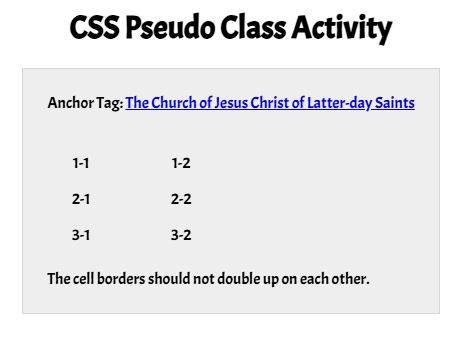
Solution Example
CodePen ☼ CSS Pseudo-classes example solution.